Yard Sale Treasure Map
- 4.5
- Rating
- 1.00M
- Installs
- Free
- Price

 Analysis by App-foxy
Finding a good yard sale is usually less about luck than timing, location, and knowing which streets are worth checking. Yard Sale Treasure Map is built around that exact problem: it turns nearby sale information into something I can plan around on a phone instead of relying on scattered signs or last-minute browsing. After using it as a shopping app, I found its main appeal is not flashy presentation but the way it helps connect a list of possible sales with an actual route.
The app is free to download and is aimed at Everyone, so it feels approachable for casual weekend shoppers as well as people who regularly hunt for furniture, tools, clothes, collectibles, or household bargains. Kolodgie Enterprises LLC has kept the focus narrow: this is a yard-sale discovery and mapping tool, not a general marketplace where I negotiate directly with sellers or arrange shipping. That distinction matters, because its value depends on how much useful local sale information is available when I open it.
How the map changes a weekend shopping trip
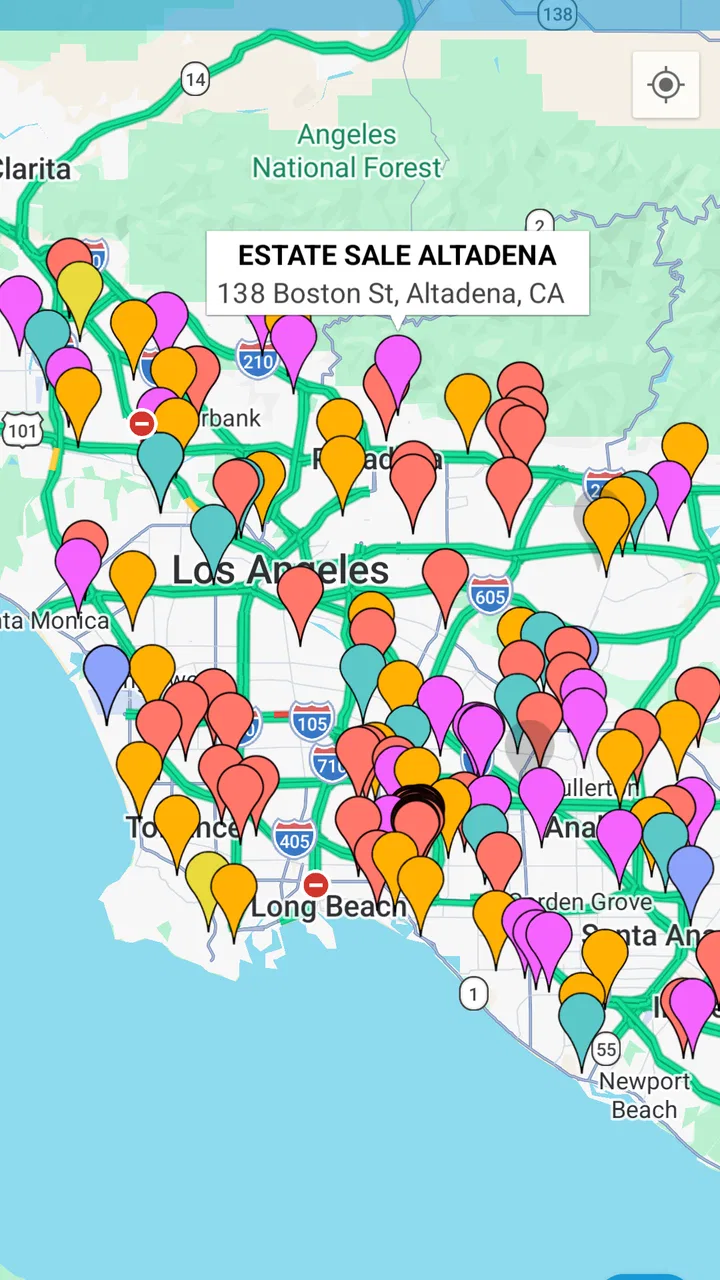
My first useful impression was that the map gives the search a geographic shape. Instead of reading one listing after another and trying to remember where each one is, I can think in terms of neighborhoods and travel direction. That is especially helpful when several sales are spread across a familiar area. I can quickly decide whether a group of stops belongs to one practical outing or whether a tempting listing is too far away to justify the detour.
You May Also Like

 Blood Strike: 2.5 Anniversary
Blood Strike’s Loadouts Turn Every Drop Into a Tactical Gamble
A close look at Blood Strike’s custom loadouts: how fast access to signature weapons reshapes its battle royale rhythm, rewards preparation, and narrows the gap between fights.

 Pandora - Music & Podcasts
Pandora’s Music Is Easy to Start, but Harder to Recover
Pandora’s strength is its low-effort path from a seed to a station. Its weak spot is how much confidence it asks you to place in connection, setup, and quiet recovery.

 8 Ball Pool
 Is Built on Rivalries, Rematches, and Routine
A close look at the rivalries, rematches, shared routines, and unanswered safety questions that turn a quick pool match into a persistent mobile community.

 Samsung Music
’s Quiet Strength Is Playing What You Already Own
Its reach comes less from spectacle than from dependable access to a personal library. That simplicity is both the app’s strongest retention engine and its ceiling.

 AccuWeather: Weather Radar
AccuWeather Review: A Quick, Clear Forecast for Everyday Decisions
For everyday plans, the best forecast is the one you can understand quickly. AccuWeather makes rain timing, radar, and local conditions easy to act on, with a few trade-offs.

 Hill Climb Racing
Why Hill Climb Racing Still Turns Crashes Into One More Run
A tiny car, a bumpy hill and one more upgrade: Hill Climb Racing keeps resurfacing because its simple chaos makes every near-miss feel personal.
More From Our News Desk
View All News


The experience is strongly connected to current information. When the app is loading sale details or refreshing the map, the quality of the session depends on the network being available and responsive. A weak connection can turn a quick planning task into waiting, and that is more noticeable when I am already outside, parked, or moving between stops. I would not treat it as a replacement for preparation before leaving home; I get the best results when I review the area and likely targets while I have a dependable connection.
That network dependence also affects how much confidence I place in what I see. Yard-sale information is naturally changeable. A sale may end early, a listing may be updated, or a location may no longer be worth visiting. The map is useful for organizing possibilities, but I still treat every pin as a lead rather than a guarantee. For me, that is a healthy way to use the app: it improves the search process without pretending that a digital map can remove the uncertainty from secondhand shopping.
Planning before leaving home
The most efficient workflow is to start with a broad look at the local map, then narrow the outing to a manageable cluster. I prefer choosing a few promising stops instead of attempting to visit every visible option. That prevents the common yard-sale mistake of spending the whole morning driving between isolated listings and arriving at the best ones too late.
A practical trick is to separate “must-see” stops from “only if nearby” stops in my own notes or mental plan. The app helps me understand where the opportunities are, while I decide which ones deserve priority. This is more useful than simply following the first result that catches my eye, because a cheap item is not really a bargain if reaching it adds a long, inconvenient drive.
Another overlooked benefit is comparison. When several sales appear close together, I can judge whether the area is likely to support a flexible route. If one stop disappoints, nearby alternatives may still make the trip worthwhile. That makes the app more valuable for exploratory shoppers than a single classified listing, where I may have no backup plan once I arrive.
What it feels like on the move
The mobile setting is where the idea makes the most sense, but it is also where the limitations become clearest. I might check the map at breakfast, glance at it again from a parking spot, and adjust my next stop after seeing how the morning is developing. Those short sessions are convenient because I do not need to carry a printed list or remember every street manually.
At the same time, I would avoid interacting with the app while driving. The useful decisions can be made before moving or after pulling over. A passenger can help with checking locations, but the app works best as a planning aid rather than something I constantly operate in traffic. This sounds obvious, yet it affects the whole experience: the map is most helpful when I use it in deliberate pauses instead of expecting it to manage the trip for me.
Screen visibility and attention also matter. Outdoor shopping often means bright light, quick stops, and limited patience. I found that a simple plan is easier to follow than repeatedly opening the app to reconsider every option. If I already know the first few areas I want to visit, the phone becomes a useful reference rather than the center of the outing.
For a spontaneous Saturday, that balance is important. I can open the app after deciding to go out and see what is available, but I should expect the experience to be more dependent on live connectivity than a saved paper route. Someone who regularly travels through places with unreliable service may find that dependence frustrating, particularly if they expect to discover and reorganize sales continuously while away from home.
When loading is slow or information changes
Every map-based shopping tool has a weak moment when the connection falters, and this one is no exception. If content takes time to appear, I do not keep tapping repeatedly; I give it a moment, check whether the map has finished updating, and then simplify my plan. Repeated refresh attempts rarely make a poor connection better and can make the session feel more chaotic.
My preferred recovery method is simple: prepare the important part of the route before leaving, remember the first destination, and keep the outing flexible. If the app becomes difficult to use between stops, I can continue toward the next planned area instead of losing the whole morning. This is not the same as having a fully independent offline experience, so I would not rely on it as my only source of directions or sale information in a place where connectivity is unpredictable.
There is also a difference between a technical failure and an ordinary change in yard-sale plans. A map can load perfectly and still lead to a sale that has ended, moved, or no longer contains the item I wanted. I consider that part of the category rather than a unique flaw, but it is worth remembering before making a long trip for one specific object. The app helps me find opportunities; it cannot guarantee the condition, availability, or outcome of a private sale.
That is why I recommend keeping the first stop close enough that a disappointing result does not ruin the day. Once I have reached the area, the map’s value improves because nearby alternatives can make the trip productive. The best use is therefore a route with options, not a single high-stakes mission.
Using it without wasting mobile data
Because the experience involves maps and changing sale information, data-conscious users should plan their browsing rather than leave the app open continuously. I would do the main search at home or on a reliable connection, identify the neighborhoods that interest me, and then use the phone in short checks during the outing. This approach is more comfortable and avoids treating every turn of the trip as a fresh research session.
I also find it sensible to avoid chasing distant listings simply because the map makes them visible. A wider search can be useful for discovering possibilities, but a concentrated local route usually gives better value once fuel, time, and uncertainty are considered. The app can show me the larger picture; my job is to reduce it to a realistic plan.
The free price makes experimenting easy, although in-app purchases ranging from ninety-nine cents to four dollars and ninety-nine cents per item may matter to users who prefer a completely cost-free experience. I would not spend automatically just because an optional item is available. First I would use the basic workflow and decide whether the app genuinely improves my shopping routine. For an occasional browser, the free entry point is likely enough to judge that quickly.
Data-conscious use is not only about connectivity or billing. It is also about attention. The more time I spend scanning every possible sale, the easier it is to turn a relaxed outing into an inefficient chase. I get more from the app when I use it to answer a specific question—where should I go first, what nearby alternatives exist, and is this route reasonable—rather than endlessly browsing.
Who will get the most from it
This app is a strong fit for people who enjoy the search itself. If you like visiting several yard sales, comparing neighborhoods, and leaving room for unexpected finds, the map-based approach gives your morning structure without making it rigid. It is also useful for shoppers looking for bulky or ordinary household items locally, where seeing several nearby possibilities can be more practical than searching a shipping-based marketplace.
Regular bargain hunters may appreciate the habit-building potential. Over time, I can develop a sense of which areas are convenient, which routes are too spread out, and how early I need to begin for the kind of items I want. The app does not make those judgments for me, but it gives me a better view from which to make them.
It is less suitable for someone who wants a guaranteed purchase, detailed product inspection, or a transaction completed entirely inside an app. If my priority is buying a specific model from a trusted seller, a conventional marketplace with item-level details and established transaction tools may be the better choice. Likewise, people who dislike driving between uncertain stops may find that the map creates more possibilities than they actually want.
I would also hesitate to recommend it as the sole tool for a long-distance trip. Its usefulness is greatest when the search area is local and I can adapt if a listing disappoints. The farther I travel, the more important it becomes to verify the destination through whatever contact information is available and to keep a backup plan.
How it compares with familiar alternatives
Compared with searching yard-sale signs from the road, the app gives me a head start. I can see the broader pattern before committing to a direction, which reduces random driving. Physical signs still have an advantage in one important way: they may reveal a sale that is not represented digitally. I see the app as a complement to street-level awareness, not a reason to ignore signs once I am already in the neighborhood.
Compared with general classified apps, its strength is focus. A general marketplace is often better when I want one item, seller communication, price negotiation, or a purchase that does not require visiting multiple locations. This app is better when the outing itself is the point and I want to combine several local possibilities into one route.
Compared with a simple list of addresses, the map reduces mental effort. A list may contain the same basic leads, but I would have to translate them into geography myself. That extra step is exactly where inefficient routes happen. The trade-off is that a map-centered experience depends more on a working connection and current map content than a handwritten list does.
Compared with asking friends or checking community posts, the app offers a more direct way to organize the search, while personal recommendations may provide context the map cannot. A friend might know that a particular neighborhood is difficult to park in or that a sale is especially worth visiting. I would combine both kinds of information when possible rather than expecting one source to answer every practical question.
Everyday scenario: a flexible Saturday route
Imagine I have a free Saturday morning and want to look for a small bookshelf, kitchen items, and inexpensive tools. I open the app before leaving, inspect the local spread of sales, and choose a compact group rather than the three most distant listings. I put the closest promising stop first, then keep two nearby alternatives in mind in case the first sale has little of interest.
At the first stop, I do not need to search the entire city again. I can focus on the area I already selected and decide whether the next nearby location is worth visiting. If the network is slow, I have still made progress because the important planning happened earlier. If a sale is disappointing, the route remains useful because it was built around several possibilities rather than one hoped-for purchase.
This is where I think the app earns its place. It does not guarantee that I will find the bookshelf, but it makes the search less random. I spend more time looking at actual items and less time wondering which street to try next. The result is a better-organized treasure hunt, not a conventional online checkout experience.
What the numbers suggest about its staying power
The app has been available since May 15, 2010, and its current version is 12.0.0. That long presence gives it the feel of an established utility rather than a brand-new experiment. It has passed one million installs, with an average rating of 4.5 from roughly 9,500 ratings and about 3,600 written reviews. Those figures suggest that the focused idea resonates with a substantial group of shoppers, while the written feedback volume also indicates that people have enough experience with it to form clear opinions.
Its minimum operating-system requirement is version 10, which makes the app accessible to many modern Android users without targeting only the newest phones. Since it is free to start, I can test the mapping workflow during one ordinary weekend before deciding whether any optional purchase is worthwhile. That low-risk entry is important for a specialized shopping tool that may be useful every week for one person and only occasionally for another.
Still, popularity does not remove the practical conditions that shape the experience. The app is only as useful as the sale information available in the areas I search, and a strong rating cannot make a distant route convenient or a changed sale reliable. I value the adoption as reassurance that the concept is proven, but I judge it by whether it improves my own local shopping routine.
My connectivity verdict
Yard Sale Treasure Map works best when I treat it as a connected planning companion. Its map-centered approach helps me turn scattered local opportunities into a sensible outing, and its free starting point makes it easy to try. The strongest use case is a nearby weekend search with several possible stops, especially when I can prepare the route before leaving and remain flexible once I arrive.
The main trade-off is clear: the convenience of live, map-based discovery comes with dependence on connectivity and changing information. I would not use it as my only navigation reference in an unreliable-service area, and I would not make a long journey for one unverified listing. For those situations, a prepared backup and a more transaction-focused marketplace are safer choices.
For ordinary local bargain hunting, though, I recommend it. I like that it supports the messy, exploratory nature of yard sales instead of trying to turn them into ordinary online shopping. Use it to build a flexible route, not to expect certainty, and the app becomes a practical way to spend less time wandering and more time finding worthwhile stops.
In my experience, the decision is simple: install it if you enjoy browsing multiple sales and want geographic context before heading out. Skip it if you need guaranteed inventory, detailed seller accountability, or a shopping experience that remains fully useful without a dependable connection. For the right kind of shopper, this is a focused and genuinely helpful shopping app whose best feature is the way it makes a spontaneous treasure hunt easier to organize.
FAQs for Yard Sale Treasure Map
01What is Yard Sale Treasure Map and how does it work?
Yard Sale Treasure Map is a mobile app designed to help users find garage and yard sales in their vicinity. By integrating with Craigslist, it provides a map-based interface that shows sale locations, dates, and details. Users can plan their routes, save favorite sales, and even filter by date or location.
02Is Yard Sale Treasure Map free to use or are there any costs involved?
The app offers a free version with basic features, allowing users to browse sales and plan routes. However, for a more enhanced experience, such as removing ads and accessing additional functionalities, there is a premium version available through an in-app purchase.
03How accurate is the information provided by Yard Sale Treasure Map?
Yard Sale Treasure Map pulls its data from Craigslist, so the accuracy depends on the information sellers provide there. Most users find it reliable, but occasional discrepancies can occur if sellers update their listings or cancel sales without notice.
04Can I use Yard Sale Treasure Map internationally or is it limited to certain regions?
While the app primarily focuses on listings in the United States and Canada due to its reliance on Craigslist data, it may display some sales in other regions if they are listed on Craigslist. However, its effectiveness is significantly reduced outside these primary areas.
05Are there any privacy concerns with using Yard Sale Treasure Map?
Yard Sale Treasure Map requires permission to access your location to provide the most accurate results. The app's privacy policy outlines how it handles user data, emphasizing that personal information is not sold to third parties. Users should review the policy to ensure they are comfortable with its terms.
Pros
- User-friendly interface for easy navigation.
- Real-time updates on local sales and events.
- Customizable search filters enhance efficiency.
- Integration with map apps for seamless directions.
- Ability to save favorite sales for quick access.
Cons
- Limited to areas with active user base.
- Requires internet access for full functionality.
- Occasional inaccuracies in sale listings.
- Ads can be intrusive without premium upgrade.
- No offline mode for map and sale details.

Yard Sale Treasure Map
Gallery